
El Super
InstacartFood & Drink
4.250.00 Reviews
- Version
- 9.30.0
- Installs
- 10.00K
- Age Rating
- Everyone
Screenshots
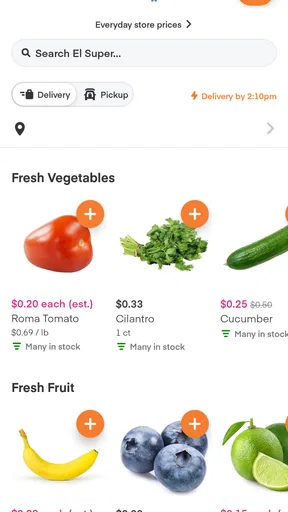
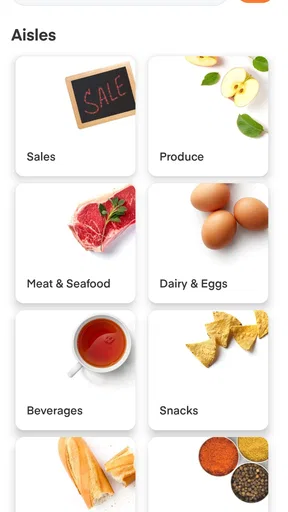
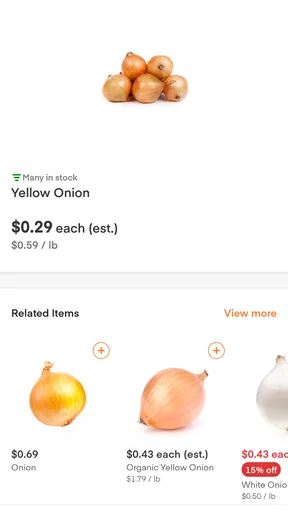
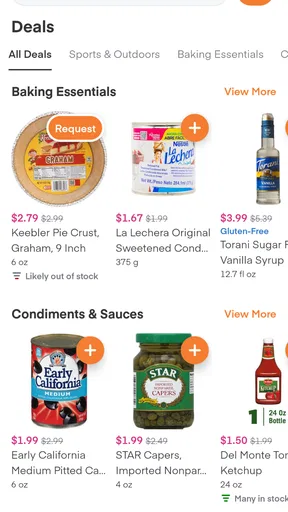
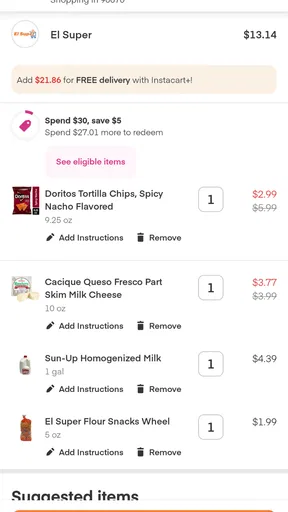
Our Review of El Super
 Analysis by Appyee
I approached El Super as a practical shopping companion rather than assuming that a grocery app automatically makes every trip easier. This Food & Drink app is developed by Instacart and is designed around the El Super shopping experience. It is free to install, suitable for Everyone, and its store summary presents it as a way to look for savings through a newer app experience.
My first impression is that its value depends less on novelty and more on whether it fits the way you already shop. If you regularly buy groceries from El Super and prefer checking options on a phone before heading out, it has a clear purpose. If you only need a quick in-person visit and already know exactly what you want, the extra setup may feel unnecessary.
Getting past the points where grocery apps usually slow you down
The most common frustration with a store app is not necessarily a broken feature. It is the small uncertainty at the beginning: whether the app has recognized the right store context, whether the product list is behaving as expected, or whether a search result reflects what you actually intend to buy. I would treat those first moments as part of the shopping process, not as something to rush through.
With El Super, I would begin by making sure I am using the current release, version 9.30.0, on a device running at least Android 8.0. That basic check matters because an app can appear installed while still behaving poorly on an older phone or an outdated operating system. Updating the app and restarting it before troubleshooting anything more complicated is a sensible first step.
Another useful habit is to decide what you want from the app before opening it. Are you checking possible savings, building a shopping plan, or trying to find a particular grocery item? A clear goal makes it easier to notice whether the app is helping. Without one, it is easy to browse broadly, lose track of quantities, and then assume the application is less useful than it really is.
The best early check is simple: confirm that the app is ready before you build your entire shopping plan inside it. If screens load slowly, searches behave strangely, or the shopping context seems wrong, I would pause there instead of continuing and hoping the issue disappears later.
Small setup checks that prevent bigger confusion
I would also check the phone’s connection before blaming the app. Grocery browsing often involves loading changing information, so a weak connection can make an ordinary delay look like a missing product or an incomplete page. Switching between a stable Wi-Fi connection and mobile data, then reopening the app, is a safe general test that does not require changing complicated settings.
Keeping enough free storage on the phone is another overlooked step. An app may already be installed, yet a device under pressure from many large files can behave unpredictably. Closing other demanding apps, restarting the phone, and trying again can separate a temporary device problem from an issue specific to El Super.
I would avoid repeatedly tapping the same control when a page appears frozen. That can create duplicate actions or make it harder to understand what happened. Waiting briefly, returning to the previous screen, and reopening the relevant section gives a cleaner result. If the problem affects only one screen, I would test another part of the app before assuming the whole service is unavailable.
Because the app is free, there is little financial risk in trying it, but free installation does not remove the need to review each shopping decision carefully. I would still check the final items and quantities before treating the app as my complete grocery plan. The convenience is useful only when it reduces mistakes rather than moving them to the last step.
How I would recover a disrupted shopping workflow
One practical use case is a rushed weekday evening. Imagine that I am leaving work, want to stop at El Super, and need to remember several staples without wandering through the store. I would use the app to organize my intentions before arriving, but I would keep a short mental or written backup of the essentials. That backup protects the trip if the phone loses connection or the app needs to be reopened.
If a search does not immediately produce what I expect, I would try a shorter, more general term rather than repeatedly entering a very specific phrase. Product names can be written in several ways, and a narrow search can make a relevant result harder to notice. I would then inspect the result carefully instead of choosing the first familiar-looking item automatically.
When the app seems to lose progress, my recovery order would be conservative: return to the last stable screen, close and reopen the app, check the connection, and restart the phone if necessary. I would not clear app data as an early experiment, because that can remove local progress or require me to set things up again. More aggressive fixes make sense only after simpler checks have failed.
A second useful scenario is planning a larger household shop. Here, the app can be helpful as a preparation tool, especially when I want to think through categories before entering the store. I would divide the plan into essentials, flexible choices, and items that can wait. That distinction is important because a grocery app can help me organize a decision, but it cannot replace my judgment about substitutions, package sizes, or what is actually available when I shop.
For savings-focused browsing, I would compare the apparent benefit with the time spent searching. A discount is not automatically worthwhile if it encourages an unnecessary purchase or sends me looking through several screens for one item. My rule would be to use the app to identify realistic opportunities, then keep the shopping list anchored to what the household will use.
When the problem may be outside the application
It is tempting to blame the app whenever a product cannot be found or a page does not respond. In practice, several other causes are possible. A connection may be unstable, the phone may be overloaded, or the service may be experiencing a temporary interruption. The most useful clue is consistency: if everything on the phone is slow, I would investigate the device or connection first; if only one area of El Super misbehaves, I would reopen that area and try again later.
I would also distinguish between a technical problem and a shopping expectation. An item not appearing does not automatically mean the search is broken. It may be listed under a different description, or the relevant store context may not match the trip I have in mind. Checking the wording, broadening the search, and verifying the selected shopping destination are more productive than assuming that the app has failed.
The same caution applies to savings. The store summary emphasizes savings, but I would not treat every visible deal or suggestion as a guaranteed reduction in my total until I have reviewed the details shown during the shopping process. My own basket, timing, and choices determine whether the app actually saves me money. That is why I see it as a planning aid rather than a promise that every visit will cost less.
There is also a human factor. If several people share grocery responsibilities, an app may not solve the communication problem by itself. I would agree on the list before shopping and use El Super as one part of that routine. Otherwise, two people can make separate decisions, overlook an essential item, or buy duplicates while both believe they are being efficient.
What makes it useful compared with ordinary alternatives
The usual alternative is a handwritten list, a notes app, or simply walking through the store and choosing items as they appear. Those methods can be faster for a very small trip. A handwritten list is also dependable when the phone battery is low or connectivity is uncertain. For a familiar purchase of a few staples, I would not open El Super just for the sake of using an app.
Its stronger case is the combination of store-specific context and savings-oriented browsing. A generic notes app can remember that I need rice, produce, and household supplies, but it does not give that list the same connection to a particular grocery trip. On the other hand, a generic grocery platform may feel more familiar to someone who shops across several retailers. If I regularly switch stores, I would compare the convenience of one broader tool with the focused purpose of El Super.
That focus can be a benefit for shoppers who already know El Super and want a more direct digital starting point. It can be less attractive to someone who expects one app to manage every retailer, every household member, and every shopping style. I would choose the focused option when the store is already part of my routine, not because a dedicated app is automatically better than a general one.
The app has an average rating of 4.2 from 134 ratings, with 50 written reviews, and it has reached over 10 thousand installs. Those figures suggest that people are trying it and that the overall response is positive, but I would read them as context rather than proof that it will suit every phone or shopping habit. A grocery tool can work well for one person and feel unnecessary to another.
Who should install it, and who should skip it
I would recommend trying El Super if you shop at the associated grocery brand often, like checking possible savings before you buy, or want a store-focused way to prepare for a trip. It is also a reasonable choice for someone who prefers using a phone to think through a larger basket before arriving. The free price makes experimentation straightforward, provided the phone meets the minimum operating-system requirement.
I would be more cautious if you usually make spontaneous, very small purchases, have limited phone storage, or dislike troubleshooting mobile apps while shopping. In those situations, a paper list or a basic notes tool may be less distracting. I would also skip it if my main goal were a universal grocery manager for many unrelated stores; the focused El Super identity may not match that need as well as a broader alternative.
For older devices, the minimum requirement of Android 8.0 is worth checking before installation. Meeting that requirement does not guarantee that every phone will feel equally quick, especially if the device has little free storage or an unreliable connection. I would judge the app after a short, realistic test rather than after an elaborate first shopping plan.
The Everyone age rating makes it approachable for a broad audience, but that does not mean every family workflow will be covered automatically. Parents, roommates, and couples still need their own method for sharing decisions and checking the final list. The app can support that routine, but it should not be mistaken for a substitute for agreement.
My practical way to make the app worth using
I would use El Super in three stages. Before the trip, I would open it on a reliable connection, identify the items I genuinely need, and look for savings without adding unnecessary products. During the trip, I would use the prepared plan as a guide rather than assuming every result or suggestion must be followed. Afterward, I would review what I actually bought so the next list reflects real household consumption.
That last step is easy to overlook, yet it is where the app can become more useful over time. If I notice that certain products are repeatedly forgotten, I can make them part of my regular preparation. If a supposed bargain keeps leading to waste, I can stop treating it as a saving. The technology is only as good as the decisions it helps me make.
Instacart is the developer behind the app, while the El Super name gives the experience its store-specific identity. I would keep that distinction in mind when deciding what kind of support or shopping behavior I expect. This is not simply a blank list with a grocery label; it is a focused way to approach shopping through the El Super brand, and that focus is both its main advantage and its main limitation.
After using it as a planning aid rather than a replacement for common sense, I find the app easiest to recommend to regular El Super shoppers who want a digital starting point for savings and preparation. It is less convincing for quick trips, multi-store households, or anyone who wants zero setup. My verdict is positive but practical: install it when El Super is already your store, test it with a small shopping plan, and keep a simple backup list until you know it fits your routine.
Verdict
Strengths of El Super
- Easy access to weekly deals and digital coupons in one place.
- Helps compare promotions before visiting a nearby store.
- Store locator makes it simple to find participating El Super locations.
- Digital shopping lists can make grocery trips more organized.
- Useful for shoppers who regularly buy Hispanic and Mexican groceries.
Limitations of El Super
- Some offers may require a loyalty account or additional sign-in steps.
- Coupon availability can vary by store and may not apply to every location.
- The app may feel less useful for shoppers outside El Super’s service areas.
- Prices and promotions may change before the app information is updated.
- A stable internet connection may be needed to load current deals and coupons.
Other Releases by Instacart
View All
Instacart Shopper: Earn money
Shopping4.2

Instacart: Get Food Delivery
Food & Drink4.8
Similar Picks in This Category
View All
Rappi: Food Delivery, Grocery
Rappi, Inc - Delivery3.5

McDonald’s: Cupons e Delivery
Arcos Dorados4.3

Swiggy: Food Instamart Dineout
Swiggy4.7

Blinkit: Groceries & more
Blinkit4.8

foodpanda: food & groceries
Foodpanda GmbH a subsidiary of Delivery Hero SE4.0

Zomato: Food Delivery & Dining
Zomato4.7
Frequently Asked Questions
What is El Super, and what can I use it for?
El Super is a shopping and grocery app designed to help users browse products, check prices, find promotions, and plan purchases from participating El Super stores. Depending on your location and the services available in your area, the app may also provide store information, digital deals, shopping lists, and options for pickup or delivery. Available features can vary by region.
Is El Super available in my area?
Availability depends on your location and the El Super stores serving your region. After installing the app, you may need to allow location access or enter a ZIP code to see nearby stores, current promotions, and eligible shopping services. If no store appears, the app may not yet support your area, or certain features such as delivery and pickup may be unavailable locally.
Can I order groceries through the El Super app?
In supported locations, El Super may allow customers to shop for groceries online and select an available fulfillment method, such as store pickup or delivery. However, these options are not necessarily offered at every store. Product availability, delivery fees, minimum order requirements, scheduling, and substitution policies can differ, so review the order summary carefully before confirming a purchase.
Does El Super offer digital coupons or special promotions?
The app can be useful for finding El Super promotions, weekly deals, and digital savings before visiting a store. Some offers may require you to sign in, add a loyalty account, activate a coupon, or present a barcode at checkout. Promotions usually include specific conditions, dates, product limits, and location restrictions, so read the offer details to confirm that it applies to your purchase.
What permissions and account information does El Super require?
El Super may request permissions such as location access to identify nearby stores and provide relevant deals or services. Creating an account may require information such as your name, email address, phone number, or loyalty details, particularly when using digital coupons, pickup, or delivery. You can review the app’s privacy policy and device settings before granting permissions or submitting personal information.
